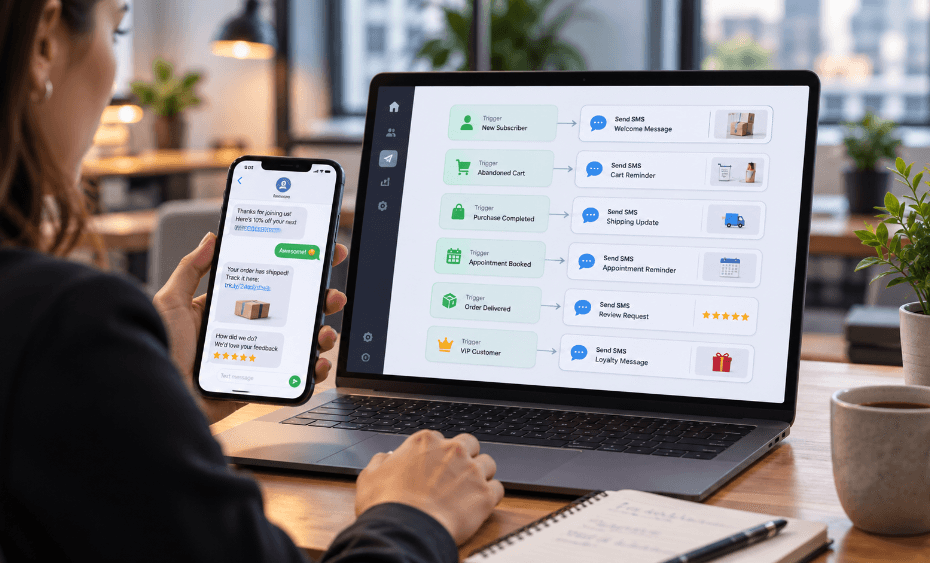
SMS marketing automation helps businesses send the right text message at the right moment without writing every message manually. Instead of relying only on one-time campaigns, companies can create workflows that trigger when a customer signs up, books an appointment, abandons a cart, completes a purchase, misses a payment, or becomes inactive.
This matters because customers expect fast, relevant communication. They do not want to search for delivery updates, appointment details, return instructions, or limited-time offers. Automated text message workflows can improve the customer experience while reducing repetitive work for sales, support, and operations teams.
However, automation should never mean careless messaging. Businesses still need proper opt-in consent, clear sender identification, STOP and HELP handling, quiet-hour awareness, and frequency control. When SMS automation respects customer permission and timing, it becomes a powerful way to increase engagement without overwhelming subscribers.
Quick Answer: What Is SMS Marketing Automation?
SMS marketing automation is sending text messages automatically based on triggers, schedules, customer actions, or CRM data. For example, a welcome message can send after someone joins a list, an abandoned cart reminder can send after someone starts checkout but doesn’t purchase, and an appointment reminder can send 24 hours before a booking.
In simple terms, SMS automation turns repeatable customer moments into reliable text workflows. As a result, businesses can respond faster, follow up consistently, and keep communication organized.
Why Automated SMS Workflows Work
Automated SMS workflows work because texting is direct, simple, and action-oriented. A customer can read a message quickly, tap a link, reply with a keyword, confirm an appointment, or ask for help. Moreover, SMS doesn’t require customers to download another app or log in to a portal.
Automation also helps teams avoid missed opportunities. A salesperson may forget to follow up with every lead, but a workflow can automatically send a reminder. A busy clinic may struggle to call every patient, but an SMS reminder can reduce missed appointments. An e-commerce store may lose abandoned carts, but an automated text can bring customers back.
The best SMS workflows share three qualities: they are timely, useful, and easy to act on.
1. Welcome And Opt-In Confirmation Workflow
A welcome workflow starts when someone joins your SMS list. This first message should confirm the subscription, identify the business, set expectations, and explain how to opt out.
For example, a brand might send:
“Thanks for joining ABC Store texts. Get product updates and offers here. Reply STOP to opt out or HELP for help.”
This workflow matters because it builds trust from the beginning. Additionally, it helps subscribers understand what they signed up for. Businesses can also use the next message to share a first-purchase discount, onboarding link, or helpful resource.
2. Abandoned Cart Recovery Workflow
Abandoned cart SMS workflows help ecommerce brands recover sales when shoppers leave items behind. The workflow usually starts after a customer begins checkout but does not complete the purchase.
A simple sequence may include:
- First reminder after 1–2 hours
- Second reminder after 24 hours
- Optional final reminder with urgency or incentive
However, cart reminders require careful consent language. Businesses should clearly disclose cart reminder texts during opt-in. Keep messages short, include the brand name, and provide a direct checkout link.
3. Browse Abandonment Workflow
Browse abandonment workflows target shoppers who view products but do not add anything to the cart. This workflow works well when a customer has shown interest but needs more information.
For example, a store can send:
“Still thinking about our waterproof hiking jacket? See colors and sizes here: [link]. Reply STOP to opt out.”
This workflow should feel helpful, not intrusive. Therefore, businesses should avoid sending too many browse reminders. One carefully timed message often works better than repeated nudges.
4. Post-Purchase Thank You Workflow
A post-purchase workflow sends after a customer buys something. It can thank the customer, confirm the order, and set expectations for shipping or next steps.
This workflow builds customer confidence by confirming the order went through. Additionally, it creates a clean transition from marketing to service. For service businesses, the same idea can confirm a booking or completed request.
A strong post-purchase text may include the order number, expected next step, and a support link. However, it should avoid adding unnecessary promotional content too soon after purchase.
5. Shipping And Delivery Update Workflow
Shipping updates are one of the most useful SMS automation workflows. Customers want to know when an order ships, when it is out for delivery, and when it arrives. Therefore, automated delivery texts reduce “Where is my order?” support requests.
A typical workflow may include:
- Order shipped
- Out for delivery
- Delivered
- Delivery issue or delay
This workflow works best when connected to e-commerce, logistics, or shipping software. As a result, customers receive accurate updates without staff manually checking tracking numbers.
6. Appointment Confirmation And Reminder Workflow
Appointment reminders help clinics, salons, repair shops, consultants, fitness studios, real estate teams, and service providers reduce no-shows. The workflow can send a message when a customer books, then follow up before the appointment.
A simple sequence may include:
- Booking confirmation immediately
- Reminder 24 hours before
- Reminder 2 hours before
- Reschedule link if needed
This workflow should include the business name, appointment date, time, location, and simple instructions. Additionally, businesses should keep sensitive details out of regular SMS, especially in healthcare or financial services.
7. Lead Follow-Up Workflow
Lead follow-up automation helps sales teams respond quickly after someone fills out a form, downloads a guide, requests pricing, or asks for a demo. Speed matters because leads often contact multiple providers.
A lead workflow might say:
“Hi Sarah, thanks for requesting info from ABC Services. What is the best time for our team to call you today?”
This message invites a reply and starts a conversation. Moreover, it gives the sales team useful context before they follow up. For better results, segment leads by source, service interest, location, or urgency.
8. Review Request Workflow
Send review requests after a purchase, appointment, delivery, or completed service. They help businesses collect testimonials while the experience is still fresh.
For example:
“Thanks for choosing ABC Dental. How was your visit? Leave a quick review here: [link]. Reply STOP to opt out.”
Timing matters. Send the request after the customer has had enough time to use the product or experience the service. Also, do not pressure customers or offer incentives that violate review platform rules.
9. Win-Back Or Reactivation Workflow
Win-back workflows help businesses re-engage inactive customers. The trigger may be 60, 90, or 180 days without a purchase, booking, or reply.
A simple reactivation message can include a helpful reminder, a personalized offer, or an update on a new product.
For example:
“We miss you at ABC Fitness. Book your next session this week and get a free body scan: [link].”
However, limit reactivation texts. If someone does not respond after one or two attempts, stop the sequence or reduce frequency. Otherwise, the workflow may create opt-outs.
10. Loyalty, Birthday, And VIP Workflow
Loyalty workflows help brands reward repeat customers. They can send points updates, birthday offers, VIP early access, referral prompts, or anniversary messages.
For example:
“Happy birthday from ABC Store! Enjoy 20% off this week with code BDAY20: [link].”
This type of automation feels personal when the data is accurate. Therefore, businesses should keep customer profiles clean and avoid sending incorrect birthday, loyalty, or VIP messages.
SMS Automation Best Practices
Automation works best when businesses keep messages relevant and respectful. Every workflow should have a clear trigger, goal, stop rule, and opt-out path.
Before launching, check these basics:
- Collect proper SMS consent
- Identify your business clearly
- Keep messages short and useful
- Include STOP instructions when appropriate
- Avoid sending too often
- Respect quiet hours
- Segment audiences by behavior or interest
- Connect workflows to CRM or ecommerce data
- Monitor replies and failed messages
- Review performance regularly
Additionally, each workflow should stop when the customer completes the action. For example, an abandoned cart flow should stop after purchase, and an appointment reminder should stop after cancellation.
Final Thoughts
SMS marketing automation helps businesses turn common customer moments into timely, useful conversations. Welcome texts, cart reminders, shipping updates, appointment reminders, lead follow-ups, review requests, win-back messages, and loyalty workflows can all save time while improving engagement.
Ultimately, the best automated SMS workflows feel helpful, not robotic. They respect consent, use clear timing, provide real value, and make the next step easy. When businesses build SMS automation around customer needs, text messaging becomes more than a campaign channel. It becomes a reliable part of the customer experience.